

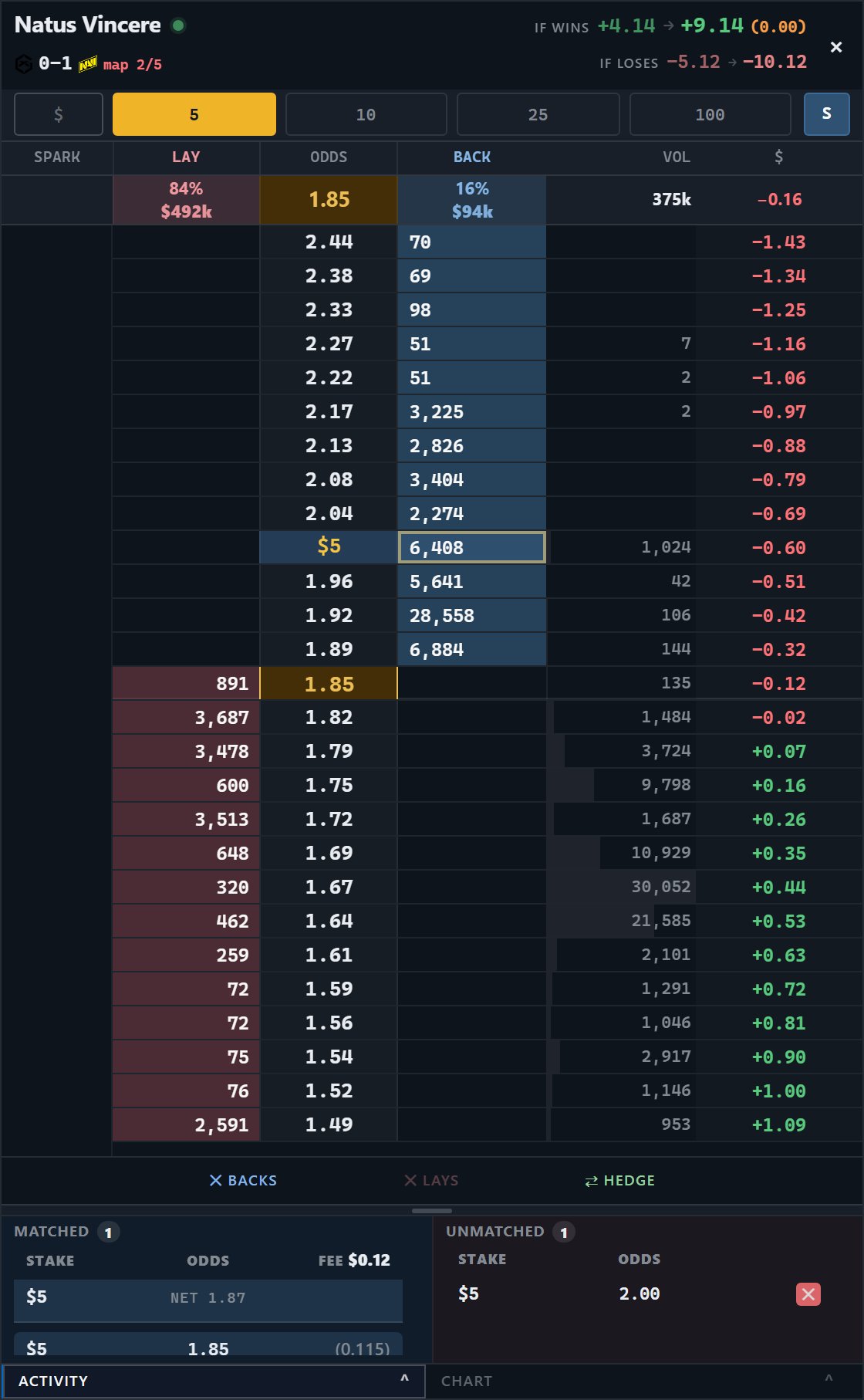
One row per price, with both sides of the book on the same rungs. The amber $5 is this trader's own order, resting where they left it.
That is the order and those are the names a new desk starts with. Both are
yours to change, along with the column widths, in Settings, Ladder.
Placing
Click a BACK or LAY cell to place at that price. Click into the current market price for a taker order that fills now. Click away from it for a maker order that rests until the market reaches your price. Click the same cell again to stack more at that price. The amber total in the odds column grows with it.A resting order never jumps the spread. It sits at the price you chose and fills
only when the market gets there.
Polymarket service alerts
A ! appears beside the market name only when Polymarket reports a trading service problem. Select it to open Polymarket’s status page. Amber means partial degradation. New orders remain available, but allow for slower or incomplete updates. Red means a major outage. New orders pause while closes, hedges and cancels remain available. The alert and the red outage pause are enabled by default. You can turn them off in Settings, Polymarket. No action is needed when the marker is absent.Working orders and fills
An order can be filled all at once or in smaller parts. Unmatched shows the amount still waiting. Matched shows the amount already traded. P&L and the position update from confirmed venue data as fills arrive. Your working stake appears in amber on the price row. With a mouse, drag that amber stake to another row to cancel it at the old price and place the same remaining amount at the new price.Cancelling
Four ways, and they differ in reach.Closing out
Two ways out, and they are the same trade at different sizes. ⇄ hedge flattens the available position through the book in one click. It takes whatever the market is offering right now. Click a P&L cell to close at one particular price instead. The column already shows what closing at each rung would lock in, after fees, so you are picking a number you can read rather than doing the arithmetic first. The cells only respond while you hold a position the book can actually close. The P&L remains visible after trading activity, including while fills, positions and working orders are being reconciled. Tickside keeps the last validated value rather than briefly showing zero or hiding the column. The venue remains the authority for the final position, fill and fee. Closing a ladder window does not close a position or cancel an order. If the ladder has a position or working order, Tickside asks for confirmation before closing the window.What your stake means
The S / L / E button (or M) decides what your preset stands for. This is the control most worth understanding, because the same number can mean three very different amounts of risk.If you are new, start with S for Stake in paper mode.
- S for Stake
- L for Liability
- E for Exposure
The figure is the stake. A back risks it. A lay risks it × (odds − 1).So $100 at 1.10 risks $10, and the same $100 at 10.0 risks $900.
Below the ladder
Matched / Unmatched lists your fills and your working orders. The header carries exposure and live P&L.The header chips
The controls beside the market name open the features supported by that venue. Markets shows related markets. Line opens the price chart. Flow shows trades as they happen. A control is hidden when the selected venue cannot support it safely. The cash figure in a live ladder asks for the current available balance as soon as the ladder opens. It no longer has to wait for the next portfolio refresh. Several open ladders share the same request, so opening more ladders does not multiply balance calls. After a reload, Tickside may show the last confirmed cash for the active account while the live balance refreshes. An≈ sign marks that temporary figure. It is
only used for display: new orders still wait for the current venue balance.